
A private label eye serum artwork handoff should tell the next person exactly which words, images and product version belong together. A beautiful preview is useful, but it cannot replace a clear record of the files being reviewed. When a designer, brand manager and supplier work from different attachments, even a small wording change can appear on one panel while an older version remains elsewhere.
This guide explains how to organize that handoff using the Lanthome Pink Spicule Eye & Face Serum reference. The focus is the working relationship between product information, packaging copy and design files. It is an editorial workflow for brand teams, not a ready-made label or a set of product instructions.
Begin with three linked records: the product version, the copy version and the artwork version. Give each a clear owner and a recognizable identifier. Those records make it possible to discuss a change without assuming everyone has opened the same file or understands the same intended product.
Read the reference without adopting its label
The source page calls the product Pink Spicule Eye & Face Serum and describes a vivid pink serum concept for product development. It lists liquid serum as the format, 30 ml as capacity, and OEM, ODM and private label service wording. Vitamin B12, niacinamide and collagen appear as ingredient direction labels on the page.
These are reference-page facts, not a complete approved label for your future product. The page asks buyers to discuss application, texture, ingredient documentation and wording before sampling. Its MOQ guidance depends on formula and packaging; it does not provide a fixed order quantity.
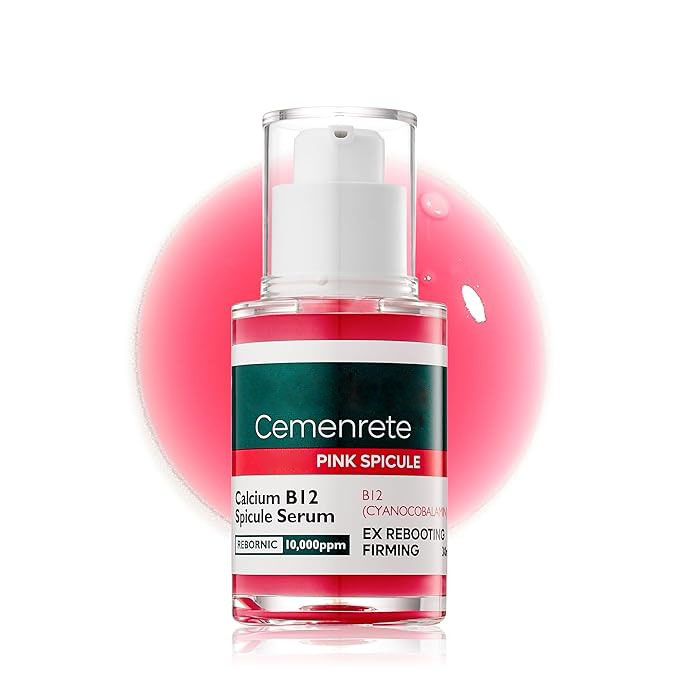
The online photograph shows a pump-style container with printed label text. Treat it as a product reference image. Do not copy the pictured brand name, numerical expressions or benefit wording into your own artwork. The photograph does not establish permission to reuse another label design or confirm the specifications of the version your brand will order.
Create a short source note that contains the page URL, capture date and the information you want to clarify. Keep that note separate from the copy intended for packaging. This separation lets a designer understand the visual starting point without mistaking source material for instructions to reproduce it.
Identify the exact product version being designed
Before arranging text, ask which product and container version the artwork is intended to describe. Record the offered product reference, intended customer name, proposed fill and packaging reference. A catalog capacity can start the discussion, but the final artwork must correspond to the specific configuration being prepared.
Give the project a working identifier that stays useful when a marketing name changes. For example, an internal code such as EYE-A can identify the working product while the team discusses its public name. The code is an organizational example, not a supplier identifier or a statement that a particular variation is available.
If two packaging proposals are under consideration, keep them as separate options. Do not place one option's dimensions beside another option's artwork preview. The person reviewing the files should see which container and layout belong to each proposed version.
Write down which decisions remain open. A pending product name, unconfirmed fill or undecided container should appear as an open item in the project record. It should not be silently replaced with an attractive phrase or a number taken from a different reference image.
Build a copy deck before placing text on artwork
A copy deck is a document that holds the wording to be used in the design. It allows the team to review sentences without simultaneously making decisions about color, alignment and spacing. Organize it by intended location and assign a short identifier to each text block.
Keep product identity in one controlled block
Place the proposed brand name, product name and short descriptor together. Indicate which words have been selected and which are still under discussion. The designer should not need to combine phrases from several emails to assemble the front-facing identity.
Keep supplied information distinct from creative copy
Separate the approved product information supplied for the specific version from optional brand storytelling. Obtain the actual ingredient wording, use information and other product-specific text through the responsible project contacts. Do not construct those fields from the catalog's ingredient tags or from text visible in a photograph.
Give every block a status
Use plain statuses such as proposed, awaiting information and approved for this revision. Apply the status to each block instead of assuming that one approved headline means the entire document is ready. Include the date and the person or role responsible for resolving any open wording.
Map copy to the available packaging areas
Request the layout information for the actual proposed packaging from the party preparing it. Use the supplied layout to identify where each copy block is intended to appear. Avoid drawing a final print layout from the apparent proportions of a web photograph.
The mapping can remain simple: product identity on the designated front area, longer product information in the designated information area, and any other supplied text in its agreed location. These are organizational descriptions, not a statement about required label panels or a prescribed label arrangement.
Connect each location to a copy block identifier. If the name block is N01 and the description block is D01, the artwork notes can refer to those identifiers instead of retyping the words. When D01 changes, the team can identify every location that uses it.
Keep a location open if its size or purpose is unresolved. Ask the packaging contact what information is needed to complete the layout. A designer can prepare a concept while that question is open, but the file should clearly retain its concept status until the intended packaging and text are aligned.
Distinguish reference images, concepts and review proofs
Label each visual asset according to its purpose. The catalog photograph identifies the source product. A concept image explores the proposed presentation. An artwork proof shows the current layout for review. Those assets answer different questions and should have different filenames or captions.
For the pink serum reference, use the source image to explain the starting visual direction without treating its printed wording as your copy deck. If a designer creates a concept with your proposed name, label it as a concept rather than presenting it as a photograph of a finished branded product.
Maintain a small image index with the filename, intended use, associated product version and current status. Record where the asset came from and whether the team has selected it for the project. Keep discarded alternatives out of the folder designated for the current handoff.
When preparing a preview, include enough context for the reviewer to understand what they are seeing. A close view can help with wording, while an overall view can help with the relationship between elements. Neither view independently confirms print production, product performance or the availability of a proposed packaging treatment.
Give files names that reveal their purpose
A filename should identify the project, the document type and the revision without requiring the recipient to open it. A hypothetical name such as EYE-A_copy_v03 distinguishes the copy document from EYE-A_artwork_v03. Add the date where it helps your team recognize the current delivery.
Avoid repeatedly adding words such as final, latest and new to filenames. They can describe several competing files equally well. Use a simple revision sequence and a delivery index that states which files belong to the current review package.
Record the relationship between revisions explicitly. Artwork revision four might use copy revision three if only positioning changed. Conversely, a copy change may require an artwork revision even if the layout looks almost identical. Matching version numbers are less important than an accurate record of which files were used together.
Keep editable working files and review exports identifiable. Ask the receiving party which file types they need, and provide the requested formats through the agreed delivery route. Do not assume that a preview image is sufficient for later editing or that a particular software format is supported by every recipient.
Consolidate feedback into actionable changes
Assign one person to collect comments before sending the next revision request. Reviewers can contribute separately, but the designer should receive a consolidated instruction that resolves contradictions. Two simultaneous comments asking for different product names cannot both be implemented coherently.
Each requested change should identify the location, the existing item, the replacement or desired result, and the reason. For example, “In the front identity area, replace the old product name with approved block N01 from copy revision three” is more actionable than “Please update the wording.”
Separate a correction from an open question. A correction provides a decided change. A question asks for information or presents an unresolved option. Marking both as immediate instructions can lead the designer to implement an unapproved suggestion.
Use a short change list with one entry per issue:
- Location or copy block affected.
- Requested change or question.
- Person or role responsible for the answer.
- Status in the next revision.
- File in which the change was checked.
After receiving the revision, check each entry against the new file. Close an issue because the specific change has been verified, rather than because the document carries a newer filename.
Review the proof against the copy deck
Read the proof alongside the identified copy revision. Compare the wording directly rather than relying on memory. Check the product name, repeated descriptors and any supplied quantities wherever they appear. Repetition is a common place for an older phrase to remain unnoticed.
Review text and layout in separate passes
First examine whether the intended words are present and associated with the correct product. Then examine whether their arrangement is readable in the supplied preview. Separating these tasks helps a reviewer notice a missing sentence even when the overall design is attractive.
Check the intended presentation size
Use the dimensions and viewing method supplied for the project when reviewing legibility. Ask for a suitable proof if the current preview cannot show the text clearly. Do not infer the printed size from an image displayed at an arbitrary zoom level on a laptop screen.
Record what the review actually covered
State whether the review concerned wording, visual arrangement or another defined part of the handoff. Approval of one aspect does not automatically settle unrelated product information or production details. A clear review note helps the next person understand which questions are closed and which still need a response.
Handle language variants as separate deliverables
If the project uses more than one language, identify each language version in the copy deck and file index. Keep the corresponding product references and artwork versions linked. Do not place an unreviewed translation into the design simply to fill the space occupied by the original text.
Ask the responsible language reviewer to work from the same approved source copy. When the source changes, identify the affected blocks and return them for review. A small change to a descriptor can require attention in several versions, even when the packaging layout remains unchanged.
Check the layout again after approved wording changes. Different text lengths can alter line breaks and the relationship between nearby elements. Treat that as a design review task, while leaving the meaning of the wording with the person responsible for the language version.
For a hypothetical two-language project, keep two clear review records instead of one general approval message. Each record should identify the copy, artwork and reviewer involved. This approach makes it easier to prepare a later revision without guessing whether a previous comment applied to one language or both.
Assemble a handoff package the recipient can navigate
Include a short index that lists the product reference, current copy file, artwork file, review export and open questions. State the purpose of the delivery: concept discussion, wording review or another agreed stage. That statement gives the recipient a clear task rather than a folder of unexplained attachments.
Place the requested current files together, and identify where earlier revisions are retained for reference. Keep superseded files outside the current delivery selection. A recipient should not need to compare modification times or guess which file named final is authoritative.
Add a concise note describing the changes since the previous delivery. Mention affected copy blocks and locations so that the reviewer can focus on the revised areas while still checking their context. If no wording changed, say which layout elements changed instead.
Request an acknowledgment that identifies the files received and the next action. This is more useful than a generic confirmation that an attachment arrived. It establishes whether the recipient is reviewing the intended revision and gives the team a place to record any missing input before continuing.
Keep the handoff useful for later revisions
After a review cycle closes, retain the linked product, copy and artwork identifiers with the recorded outcome. The value of this record appears when a name, container or product detail changes later. The team can see which materials depend on the changed information and prepare a defined update.
Before reusing artwork for a repeat project, confirm that the product and packaging references still match the intended version. Do not assume that a familiar appearance means every detail is unchanged. Ask for the current information where the earlier record is incomplete.
A practical first inquiry can be short: identify the Pink Spicule Eye & Face Serum reference, explain the packaging direction under discussion and ask which product information and layout inputs are available for the proposed version. Send that request through the Lanthome project inquiry page.
The resulting handoff should let a designer locate the right words, a reviewer identify the current proof and a purchasing colleague understand the product version being discussed. That shared clarity is the purpose of the process; the files support the conversation rather than replace the product decisions it still requires.
Related Links
- Pink Spicule Eye and Face Serum - View the liquid serum reference and its listed development directions.
- Skincare Products - Browse the site's product catalog.
- OEM and ODM Development - Explore information for preparing a development discussion.
- About Lanthome - Read the company introduction.
- Project Inquiry - Request information for your proposed product version.
- Buyer Insights - Read additional articles for skincare brand teams.
- Hydrogel Eye Patches Packaging Guide - Explore a separate packaging planning guide for eye patches.