A private label body lotion product page should answer a sequence of ordinary questions: what is this product, which version am I viewing, what information supports its description, and what should I do next? Organizing those answers is an editorial task that begins before a designer arranges the page or a photographer prepares the first image.
For brand teams, the challenge is turning a supplier reference into clear customer content without carrying unconfirmed details into the finished listing. A long catalog title, an attractive bottle and a proposed scent name each provide different information. They should have different jobs in your content plan.
This guide uses the Lanthome body lotion catalog reference to show how to organize a page, commission useful photographs, match variants and prepare an editorial handoff. It addresses content decisions rather than selecting a formula or promising a sales result.
Establish what the catalog reference actually tells you
The reference title includes body lotion, naturally derived plant-based moisturizers and coconut vanilla. It also contains benefit language. The page identifies SKU 1601631403567, displays OEM, ODM and private label service wording, and gives MOQ guidance as “Contact us.” Capacity and format fields do not provide a filled specification.
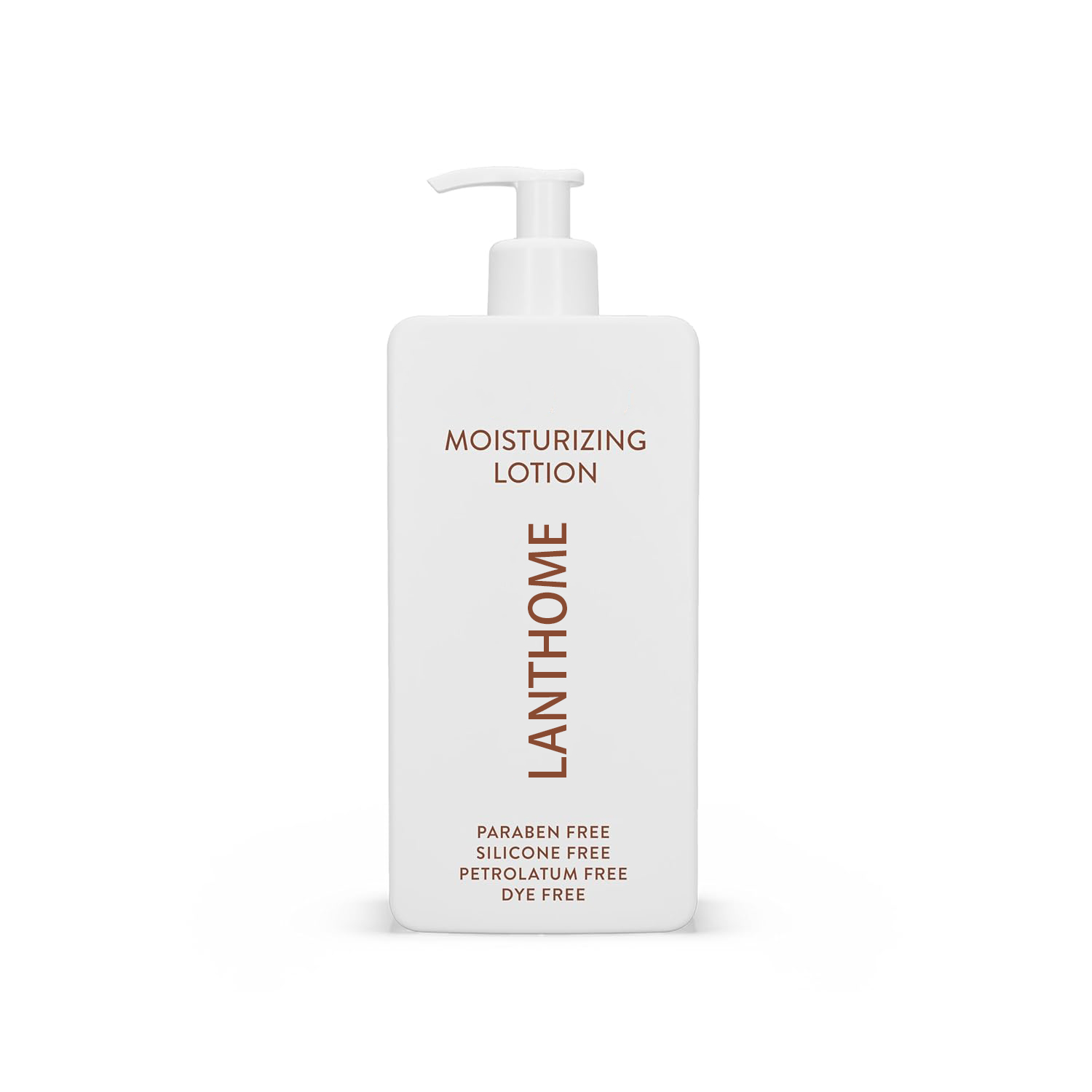
The main image shows a white pump bottle. Treat that photograph as a catalog reference, not confirmation of the container your brand will receive. Similarly, words visible on its label do not independently establish the composition or approved claims of a future branded product.
Create a source note with the URL, capture date, reference SKU and unanswered questions. Keep the catalog title in that note so the supplier can identify the item. Your eventual customer title should use the confirmed product identity and selected version, rather than reproduce every phrase in the source title.
The source also displays a Face Care category beside a body lotion title. Flag that mismatch for clarification; do not turn the category label into an instruction to use the lotion on the face. A content plan can make progress while such questions remain visibly unresolved.
Map the page around the reader's next question
Prepare a short page outline before writing individual paragraphs. Give each section one purpose, and name the information needed to complete it. This creates a useful assignment for a copywriter and keeps the designer from filling empty space with unsupported promises.
A practical sequence is product identity, selected option, concise description, visual details, confirmed product information, frequently asked questions and the next action. On a retail page, purchase controls may sit near the top. On a sourcing page, the equivalent action may be a product inquiry. Choose the sequence for the actual audience.
Place essential version information near the controls that depend on it. A reader should not need to open an unrelated accordion to discover that the photograph shows a different size or quantity from the selected option.
For every section, identify one question it answers. If two sections repeat the same sentence about the product's appeal, combine them. If a section cannot be completed from identified information, list the missing input in the working document instead of inventing a replacement.
Write the first screen with precise product identity
Start the opening content with a short title that identifies the confirmed product category. Add a version name only when it corresponds to a real, approved option. Keep internal supplier identifiers available to the team without forcing them into the customer headline.
The supporting sentence should explain what the reader is viewing. Avoid stacking adjectives such as luxurious, powerful and advanced in place of product information. A useful opening sentence has room for a confirmed format or other relevant distinction; an incomplete specification is a reason to request an answer.
Beside the main image, reserve space for the selected option, confirmed quantity information and a clear action. Label the unit consistently wherever it appears. If the project is still a sourcing discussion, use inquiry wording that reflects that stage rather than implying stock availability.
Review the first screen as a single statement. Title, photograph, option selector and action should all refer to the same product version. A correct sentence can still mislead in context if the image shows two bottles while the selected offer includes only one.
Add short control labels to the writing assignment. Specify the text above the option selector, the wording on the inquiry button and any sentence explaining what happens after the click. These small pieces of copy deserve the same review as the description. For example, “Request product information” asks for a different action from “Buy now.” Select the wording that matches the actual destination, then check it in the assembled page.
Keep scent, ingredients and visible appearance distinct
The coconut vanilla wording in the catalog title is a useful question for the supplier. It does not establish whether those terms describe a scent direction, named ingredients or another aspect of the reference. Ask what the wording means for the proposed product before adapting it for your page.
A scent description and an ingredient list serve different purposes. If a scent name is confirmed, present it as a scent name. Use the approved ingredient information for the ingredient section, and review any proposed ingredient story against that same product version.
Photography needs the same discipline. Coconut pieces, vanilla pods and botanical props can suggest a formula story even when the caption makes no explicit claim. Keep them out of the shoot brief until the team has agreed what they communicate and whether that message is supported.
Describe visible appearance from the approved sample and relevant photographs. Color, dispensing appearance and container shape can be documented separately from product benefits. A texture photograph is an illustration of a sample; it does not establish a lasting result, universal skin suitability or a claim about performance.
Brief six images with six different purposes
Give the photographer an asset list that names the question each image should answer. Include the approved sample reference, component version and intended placement. The following six-image structure is an editorial proposal, not a statement about which photographs or packaging options Lanthome supplies.
Main product view
Show the selected product clearly against a simple background. Define whether the image includes the bottle alone or its confirmed accompanying pack. Leave enough space around the product for mobile layouts. Provide the exact version reference so the photographer does not select a visually similar sample.
Dispenser detail
Show the closure and dispensing interface of the approved container. Choose an angle that explains its appearance without inventing performance claims about dosing or leakage. If the pump is photographed open, make sure that view belongs to the same component as the main product image.
Texture reference
Photograph a small dispensed sample with consistent lighting and color treatment. Record which sample was photographed. Ask the editor to preserve its appearance rather than smooth away characteristics to match a mood board. Do not add a duration or result claim beside the texture image without separate support.
Label information view
Provide a readable view of the approved artwork where useful. Match the image to the current copy revision, including the selected variant. Review small text at its actual display size. If it becomes unreadable on mobile, supply the relevant information as accessible page text as well.
Included items view
Show exactly what belongs to the selected offer or reference configuration. Keep decorative props visually separate from included items. Where a carton, accessory or second bottle appears, confirm its role and write a caption that makes the contents clear. A styled group photograph should not define quantity accidentally.
Context view
Use the final image to illustrate the agreed setting or presentation idea. Avoid implying an unconfirmed use, user group or portability feature through the scene. For example, a travel setting introduces a different message from a bathroom shelf. Choose the setting deliberately and check it against the completed brief.
Match every variant to its own content
Build a simple working record for each proposed version, even if the launch initially has only one. Include the internal identifier, customer label, confirmed amount, scent designation if applicable, image filenames and the copy revision that belongs to it. Leave unavailable information clearly marked in the internal record.
Decide which fields are shared across versions and which must change with the selection. A general brand introduction may be shared. A quantity statement, main photograph or version-specific description may need to change. The content team should specify this behavior instead of leaving the developer to infer it.
Check naming consistency across the selector, image captions, description and inquiry or purchase controls. Use one spelling for each approved version name. A changed label should not silently point to images from the previous version.
For multiple quantities, distinguish the amount in an individual container from the number of containers included. Write both values clearly once confirmed. Do not infer either from the catalog image. Test each available selection and compare what the page shows with the working record before release.
Use draft copy blocks as assignments, not ready claims
Templates help teams see what information is missing, provided their status remains clear. The following examples are internal writing structures only. They are not approved descriptions of the reference lotion and should not be pasted into a live page without completing and reviewing them.
Identity block: “Product name: approved customer name. Version: confirmed option label. Included contents: confirmed quantity and components.” This block gives the writer specific fields rather than a request to make the introduction more persuasive.
Description block: “Introduce the confirmed body lotion identity, then describe one relevant attribute supported by the approved product information. Follow with the practical details the reader needs for this version.” The instruction leaves room for brand voice while requiring an identifiable basis for each detail.
Information block: “Use information: approved product-specific directions. Ingredients: current approved ingredient information. Additional notes: wording supplied for this version.” Keep these as editorial assignments until the responsible team provides the actual text.
Inquiry block: “Reference this body lotion and tell us which product information your team needs to prepare its launch content.” An inquiry prompt can request the next input without promising customization options, response timing or an order quantity that has not been confirmed.
Choose FAQs that close actual information gaps
An FAQ section should help the reader resolve a decision that the main page has not already answered. Gather questions from the working content record and team review, then publish only answers supported for the selected product. Keep unresolved questions in the internal task list.
What quantity does this page describe?
The answer should identify the confirmed contents of the selected version. Avoid combining bottle capacity, package count and proposed order quantities into one ambiguous number. If your page is an inquiry page, explain the reference stage in the approved wording rather than imitate a retail stock statement.
What does the scent name mean?
State whether the approved wording identifies a scent option or another confirmed attribute. Do not use the answer to imply the presence of particular ingredients. For this catalog reference, the coconut vanilla wording still needs clarification before it becomes your customer-facing explanation.
Does the image show the exact version?
Match the answer to the actual asset. An approved product photograph and a concept rendering should be identified accurately. If the image is a reference, say so clearly and explain what the reader should use to identify the selected version.
Where can a buyer request further information?
Use the site's actual inquiry route and explain which reference details help identify the product. Keep the invitation specific: name the category, intended market and missing content inputs. Avoid promising a particular response schedule unless that information has been confirmed separately.
Hand off a complete content package
Deliver the copy and assets together with a small index that maps each page section to its text and image. Include the product version, artwork revision and approval status. The person uploading the page should be able to assemble it without searching several conversations for the latest file.
Give image files descriptive names and supply an accompanying alt text list. Alt text should describe the relevant visible subject, such as a body lotion bottle viewed from the front. Do not use it to add ingredient or benefit claims that the photograph cannot establish.
Separate the working notes from the final copy so a placeholder does not reach publication. Mark missing inputs in the handoff index and resolve them before releasing the affected section. If a section is omitted pending information, review the rest of the page to ensure it remains understandable.
Give the uploader one concrete preview scenario for each version: select the option, inspect its main image, read its contents statement and follow the action. Write the expected result beside each step in the handoff record. This makes review practical for someone who did not attend the product meetings and exposes mismatches that a paragraph-only copy review would miss.
Review the assembled page before release
Read the assembled page in order on a narrow screen as well as a wider display. Check that the title is readable, important version information appears near its control, photographs remain clear and captions stay associated with the correct image.
Compare the finished page with the approved content record. Look specifically for outdated artwork, duplicated paragraphs, empty specification labels and unsupported words introduced during design. Confirm that every variant shows its own correct information and that shared content still applies to all versions using it.
Follow each product and inquiry link. Check that the action takes the reader to the intended destination and preserves any product context the page is designed to pass. Read the destination's instructions before describing the process in your copy.
Finally, record the release date and the files used. When a product detail changes later, this record gives the editor a concrete starting point for updating the title, description, photographs and FAQ together.
Turn the reference into a focused content request
Prepare your next conversation around the inputs needed to finish the page: product identity, confirmed version details, approved descriptive wording and current images. Use the reference SKU to identify the catalog item, and distinguish existing information from the content your team is requesting.
Submit those questions through the Lanthome project inquiry page. A focused content request gives the discussion a defined purpose and helps your team turn the resulting answers into a coherent body lotion product page.
Related Links
- Lanthome Body Lotion Catalog Reference - View the body lotion reference identified by SKU 1601631403567.
- Skincare Products - Browse the site's product catalog and reference categories.
- OEM and ODM Development - Explore the site's development information before preparing a project inquiry.
- About Lanthome - Read the company's introduction and project focus.
- Project Inquiry - Share your product reference and the information your team needs.
- Buyer Insights - Read further articles for skincare brand teams and buyers.
- Niacinamide Serum Formula Brief Guide - Explore a separate guide to organizing serum formula requirements.